As an Arduino newbie, I’ve now gone far enough down the Arduino road to start making some mistakes. As they say in the prayer, “We have left undone those things which we ought to have done; And we have done those things which we ought not to have done” ….
After lashing up the heart rate monitor, I have been loath to disassemble it to test Phase II, which combines the TVout library with some additional hardware bits. It is always useful to work with smaller building blocks of Stuff that Works and then combine them together. So, I trundled back to Radio Shack, with the idea of getting an additional Arduino Uno board. Once there, I was tempted by an Arduino Micro, which I duly brought home, without really paying attention to any deviations from the original Arduino design.
1. The Micro requires a USB “micro” cable or adapter. I didn’t find this out until I got it home and was ready to plug it in. Back to Radio shack, and the only cable they had in stock cost another $20.00….almost as much as the Micro board itself. There are a bunch of different USB jacks. Once I got home, and calmed down, I realized that I had a Brookstone USB adapter set, which indeed had a converter; but by then it was too late.
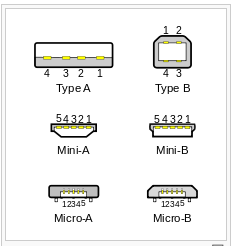
2. Once I got the Micro powered, it seems that the pin-outs are actually different than a regular Arduino. I came to the conclusion after thinking that I wasn’t installing the TVout library correctly in the Arduino development environment on the Mac. Switched to Windows, and thought the problem was solved, but then realized I wasn’t compiling for the correct target platform, but for the Uno. The library compiles perfectly for the Uno on either the Mac or PC. So, rather than take back the Micro, I simply ordered an additional Uno from Adafruit. By the time it arrives, I should have the RCA plugs soldered up and ready to go for the TV interface.
So, if I’m giving advice to Newbies… (i.e. self), it would be Eschew Experimentation and Avoid Temptation. Start with what works and build from there. It worked fine as I went from the “pin 13 blinky light demo” (the equivalent of “Hello World”) to interfacing the heart rate monitor to a seven segment display.
Other temptations:
1. Sparkfun has a Labview+Uno bundle for $50.00.
2. Adafruit has all kinds of Arduino sensors and parts.
3. As does MCM, but they really have a lot of Raspberry Pi stuff.
4. I think it would be really useful to build an Arduino from scratch parts to really understand the design. Here is an Instructable which claims you can do it for $8.00.


Leave a comment